

Main Takeaways
From this guide, you’ll learn how to protect your Binance account, including how to use early alerts to stop mistakes before funds move.
We’ll cover today’s most common scam and account takeover tactics – the two major security threats in today’s digital finance.
Finally, you’ll see the simplest high-impact setups you can enable in minutes – biometrics, passkeys, and an Anti-Phishing Code – to build layered protection that still holds up when criminals get creative.
Today, most security incidents in the digital finance space fall into two buckets: scams, where you are tricked into approving a transfer yourself, and account takeovers, where perpetrators seek to gain access enabling them to move your funds without your consent. Read on to understand common signs of these two types of attack, the early alerts that matter for disrupting them, and the simple account setups that add layered protection.
Scams vs. Account Takeovers: What’s The Difference?
A scam is a criminal scheme designed to trick a person into willingly sending funds to a scammer or knowingly granting access that enables the transfer. It relies on building trust by means of deception and later abusing this trust. Put simply, a criminal “talks” their victim into sending them money.
An account takeover (ATO) attack represents a bad actor’s attempt to gain access through malicious means (for example, via planting malware) without the user’s knowledge or consent, and ultimately move funds without the victim knowingly approving the transfer. This is more akin to breaking into a safe using technical means and stealing the money. That said, ATO attacks also often start with fraudulent communication through which criminals attempt to get hold of account credentials or sneak in malware to “break into” the victim’s account.
Scams to Watch Out for
Scams often rely on urgency and confusion to push you into clicking, scanning, or sharing before you have time to verify the source. Below are some common tactics we are seeing that you should watch out for.
Impersonation and Fake Support
Impersonation remains one of the criminals’ most persistent tactics. It includes tools like spoofed SMS messages, fake support numbers, lookalike websites, and social accounts that attackers use to pass for Binance representatives. The objective is to replace the channel you trust with one the scammer controls, then guide you into a risky action.
In 2026, scammers may even impersonate support and pressure users to install a screen-sharing app. Once they have screen access, they either walk you through a withdrawal step by step or take control and initiate the withdrawal directly from your device.
On-Chain Impersonation and Fraud
On-chain impersonation and fraud counts on you to interact with the wrong platform or asset or send funds to the wrong destination. Common examples include lookalike tokens, fake airdrops, fake platforms, and deceptive projects.
Investment Scams
Investment scams can look like legitimate earning opportunities, but the goal is to get you to send funds to a wallet or platform the scammer controls. The pitch usually includes guaranteed returns, VIP tiers, or time-limited bonuses to create urgency, along with polished websites, fake endorsements, and screenshots of withdrawals to build credibility.
Once you deposit, the scam shifts into extraction mode. Withdrawals are usually blocked with unreasonably hefty “taxes,” “gas fees,” or “unlock fees,” and you may be pressured to deposit more to “recover” your account. In many cases, the returns displayed are fabricated, and the platform disappears once enough funds have been collected.
Ponzi Schemes Disguised as Job or Tasks
Ponzi schemes disguised as jobs or task platforms promise high, consistent returns for completing simple actions or recruiting others. In reality, payouts come from new participants’ money rather than real profit. Once recruitment slows, the scheme collapses and late participants are left with losses.
Common Account Takeover Tactics
Account takeovers often use urgency and confusion to push you into clicking, scanning, or sharing before you have time to verify the source, with the goal of compromising your account. Below are some common tactics to watch out for.
Phishing
Phishing remains one of the most common ways scammers target crypto users because it relies on urgency, pressure, and misplaced trust. We will break down three common phishing patterns, but the tactics do not stand still. Scammers constantly refine their scripts as users get more cautious. The best defense is staying skeptical of unexpected messages, verifying sources through official channels, and slowing down before you click, scan, or share anything.
Fake support messages and links: Scammers impersonate “Binance support” on Telegram or via email, create urgency, and send a “verification” or “reset” link that leads to a fake site designed to steal your login credentials or 2FA codes.
Apple ID phishing: Attackers send fake Apple SMS alerts to steal your Apple ID, then use access to iCloud-synced passwords, Face ID settings, or passkeys to break into your linked accounts, including Binance, and attempt unauthorized withdrawals.
Malware via email attachments: Convincing emails (often with ZIP files or attachments) can automatically install malware on your device the moment you open them. You may not notice anything at first, but the malware can quietly steal your data, hijack your account or wallet activity, or compromise your device’s security settings by combining social engineering with technical exploitation with the goal of draining your funds.
Face and QR Scams
Don’t get scanned and scammed. Scammers can pretend to be Binance support or personnel and either ask for a face video to “verify” you, or send a QR code disguised as a reward or update – ultimately giving them instant account access.
Early Alerts From Binance
Binance may send early alerts if you are about to transfer funds to an address associated with scam activity. Do not ignore them. Pause, recheck the address, and think through whether you are being pressured into sending money, especially if someone claims to be Binance staff or customer support.
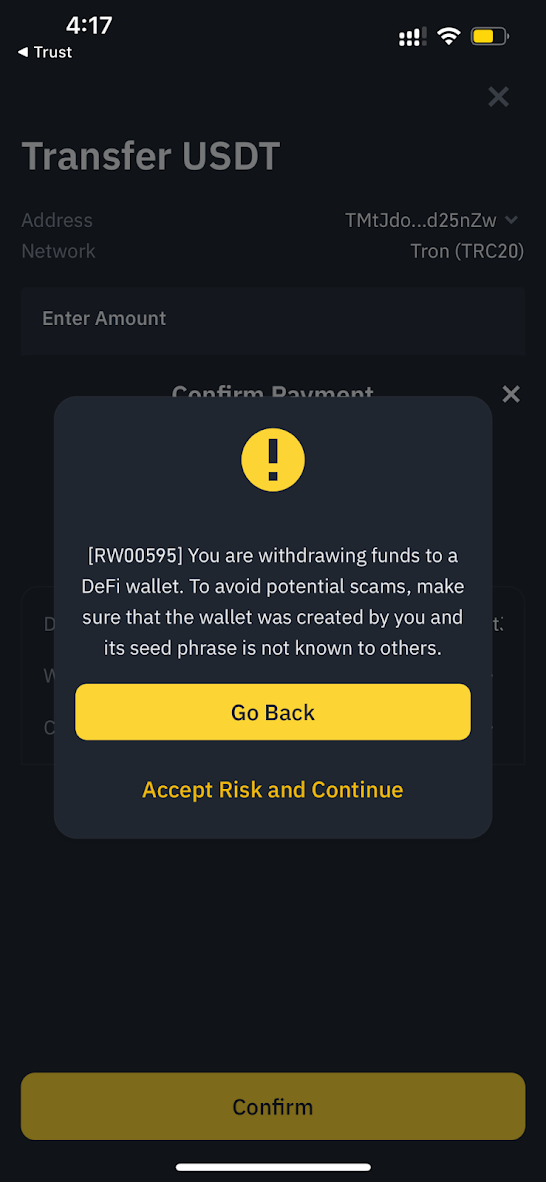
Early Alerts on Mobile
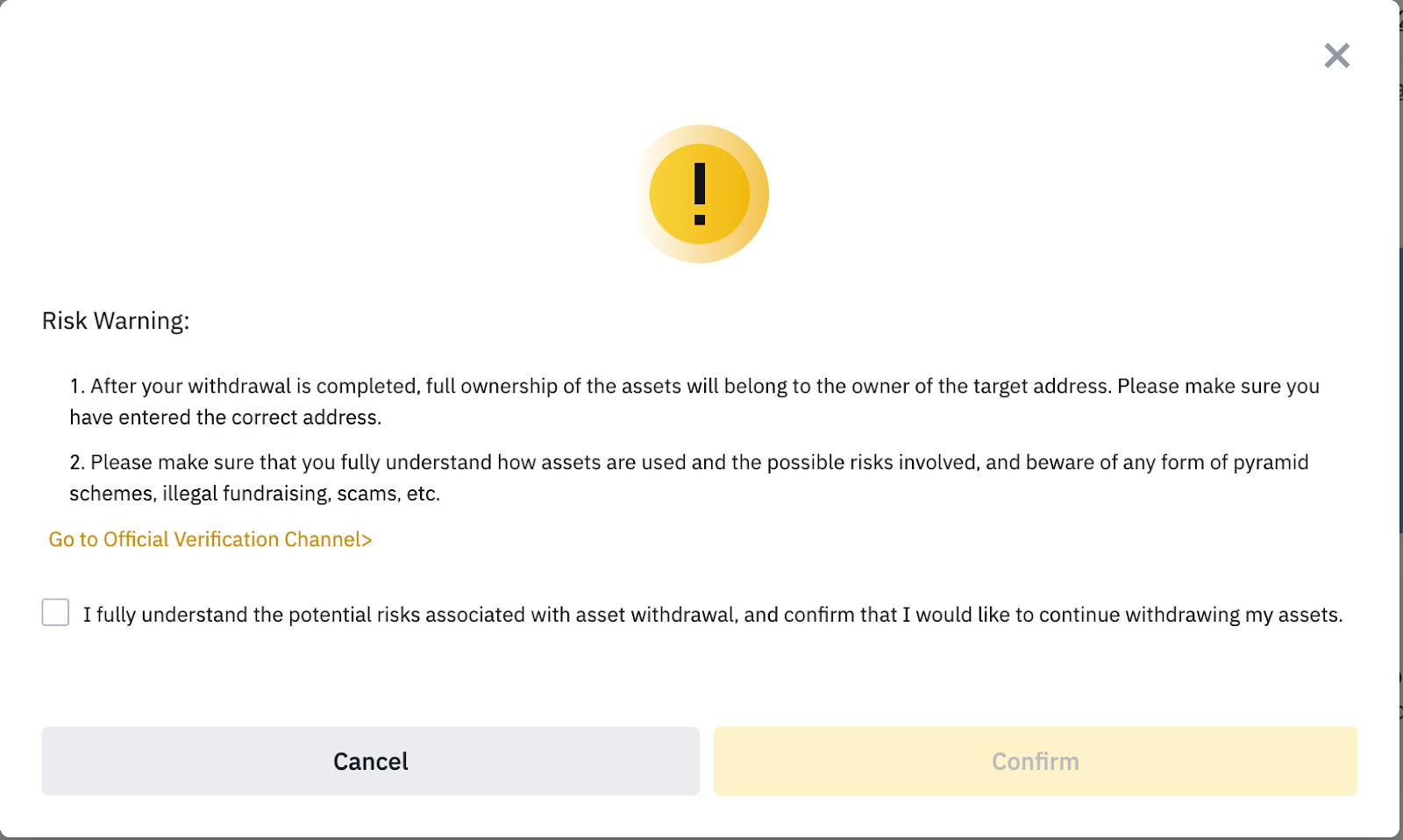
Early Alerts on Desktop
When risk signals are high, Binance may temporarily pause withdrawals on the account. This is the final layer of defense, used as a hard stop in emergency situations to prevent an account from being emptied while we are verifying what’s happening. Withdrawals are only restored after security checks and confirmation from the account owner.
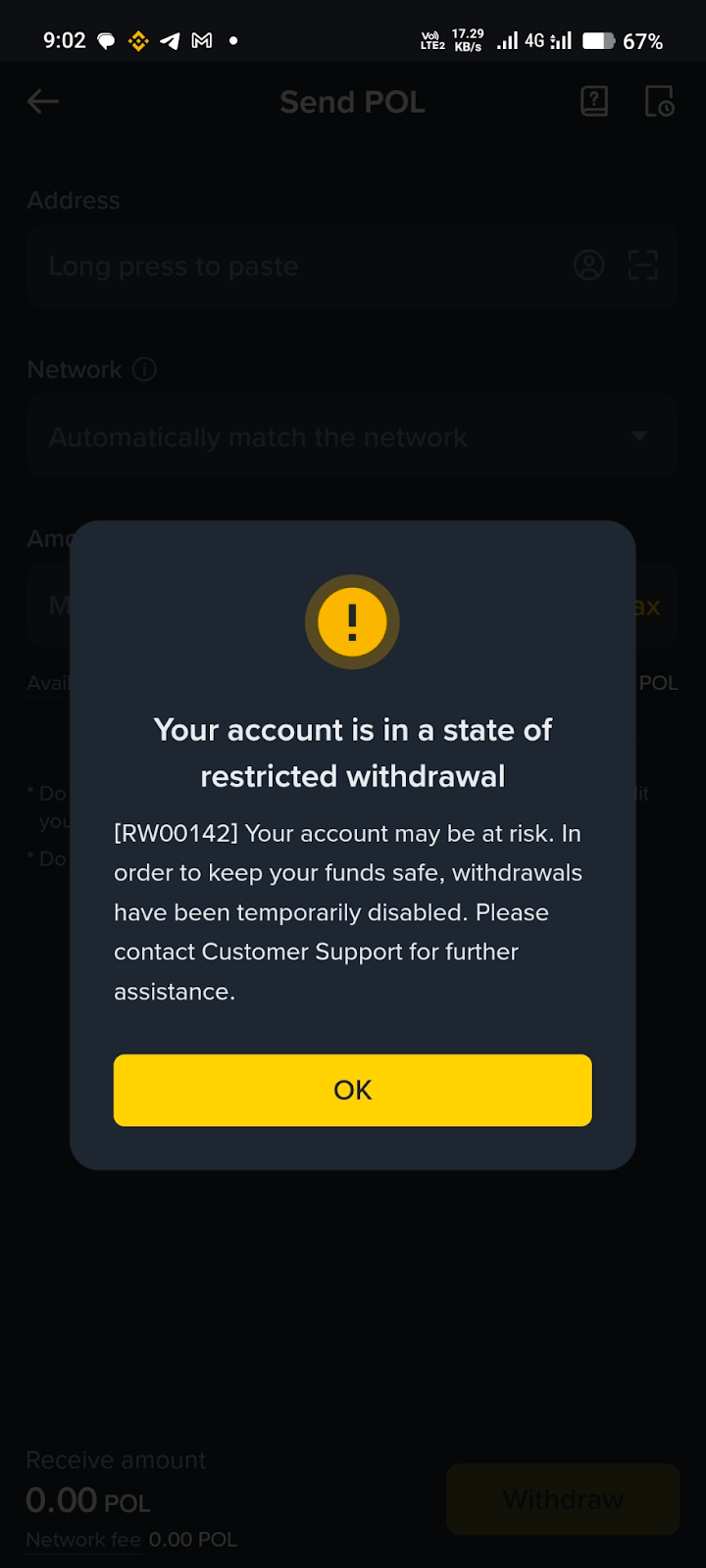
Withdrawal Block on Mobile
Simple Setups to Protect Yourself
A strong security setup is one of the most effective ways to prevent account takeovers before they start. Here are three updated ways to protect your account in 2026.
Biometrics: Use face or fingerprint verification to add a strong, device-based layer that is harder to compromise than passwords or one-time codes.
Passkeys: Add passwordless authentication that relies on cryptographic verification stored on your device, helping reduce the risk of phishing and SIM-swap attacks and making logins simpler across supported devices.
Anti-Phishing Code: Set a 8-character code that appears in official Binance emails and notifications so you can quickly spot fake messages.
In 2026, choosing just one security measure often is not enough as scams are evolving to be more complex. That’s why biometrics, passkeys, and an Anti-Phishing Code work best together, giving you layered protection.
Security Tips: Verify First, Learn Continuously
Remember to also keep all account activity, security checks, and support conversations inside the Binance app or the official Binance website. If a message asks you to call a number, move to another app, or click an unfamiliar link, treat it as suspicious. When in doubt, use Binance Verify to confirm links, emails, and contacts, and follow Binance Risk Sniper on Square, Binance Academy, plus our security blog series for ongoing scam updates and prevention tips.
Final Thoughts
If you’ve not reviewed your account security settings recently, take a few minutes to set up biometrics, enable passkeys where available, and add an Anti-Phishing Code. These measures help protect your account even if you receive a convincing message or click something you shouldn’t have. Scams evolve quickly, but staying informed through our security-related resources can help you recognize scams and account takeover attempts early and avoid costly mistakes.
Further Reading
Binance’s 8-Level Defense Against Account Takeovers
Web3 Wallet Security – Stay SAFU with Binance MPC Wallet
Bargain or Trap? – The True Cost of Second-Hand Binance Accounts